Skip to content

Building an ecosystem for Yaca Properties

I shaped Yaca Places’ live beta for discovering, saving, and updating local places, bringing neighbourhood context to Yaca Properties.

Product snapshot:

Product status
Places: live beta. Properties: in development.
My role
Product direction, UX/UI, IA, map/list logic, and contribution flows
Ecosystem purpose
Local discovery and contributions for Yaca Properties
What I designed
A shared structure for discovering, saving, and updating local places

01

Understand the area around a home

Yaca Properties needs to connect a home with the area around it. Transport, schools, shops, parks, and everyday services all contribute to that context, but the information is spread across maps, listings, and local sources.

The challenge was to build a useful local discovery ecosystem that could also provide this context for Properties. Places needed to support exploring an area today, with a consistent way to describe places and improve incomplete information.

02

Key decisions

Three decisions shaped a useful discovery experience today and a local information foundation for Yaca Properties.

  1. 01

    Use a shared place structure

    Beaches, restaurants, and parks need different details within the same discovery experience.

    Design response

    I grouped location, photos, and practical details in a consistent order, giving Properties a common structure to build on.

    Shown in:

    • Place details and amenities
  2. 02

    Connect the map and list

    Lists support comparison, while maps make proximity easier to understand.

    Design response

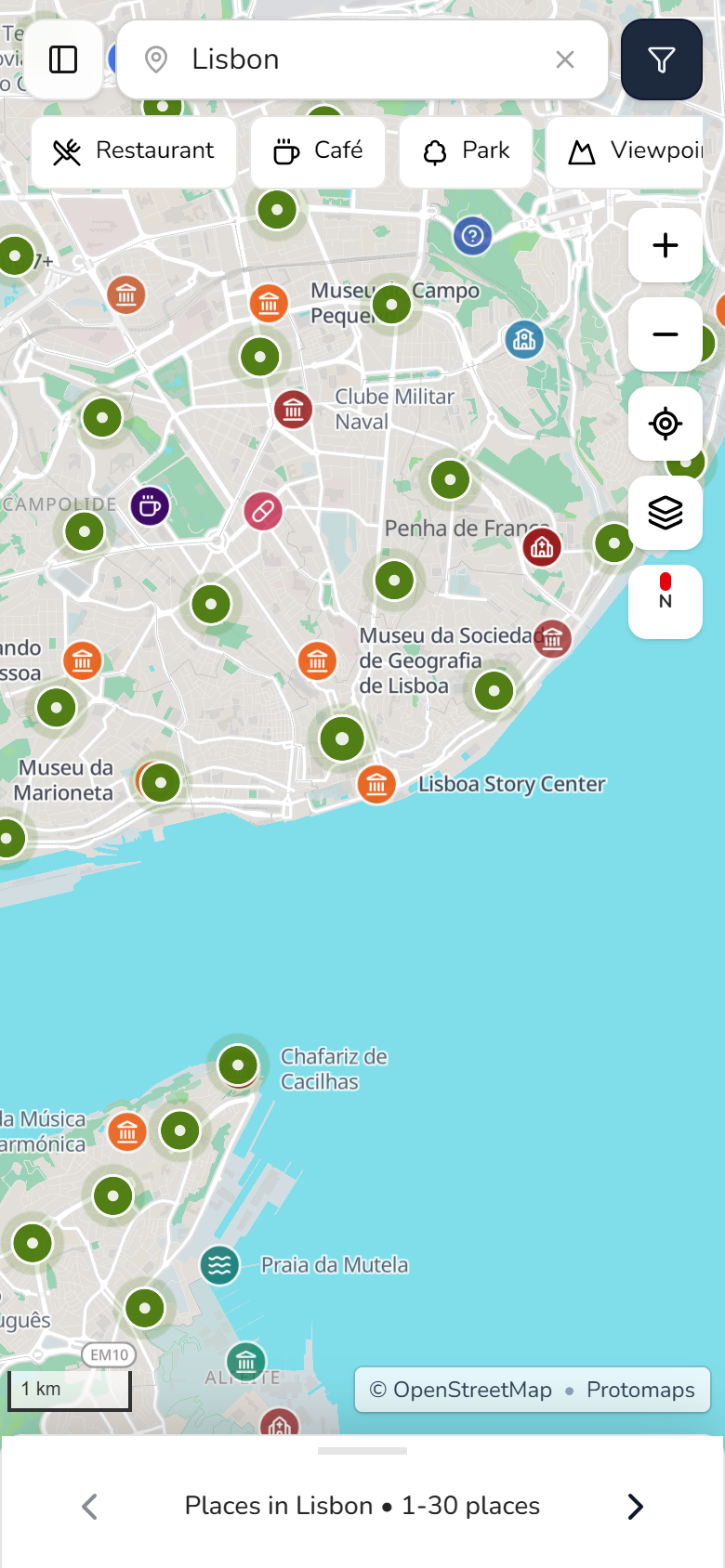
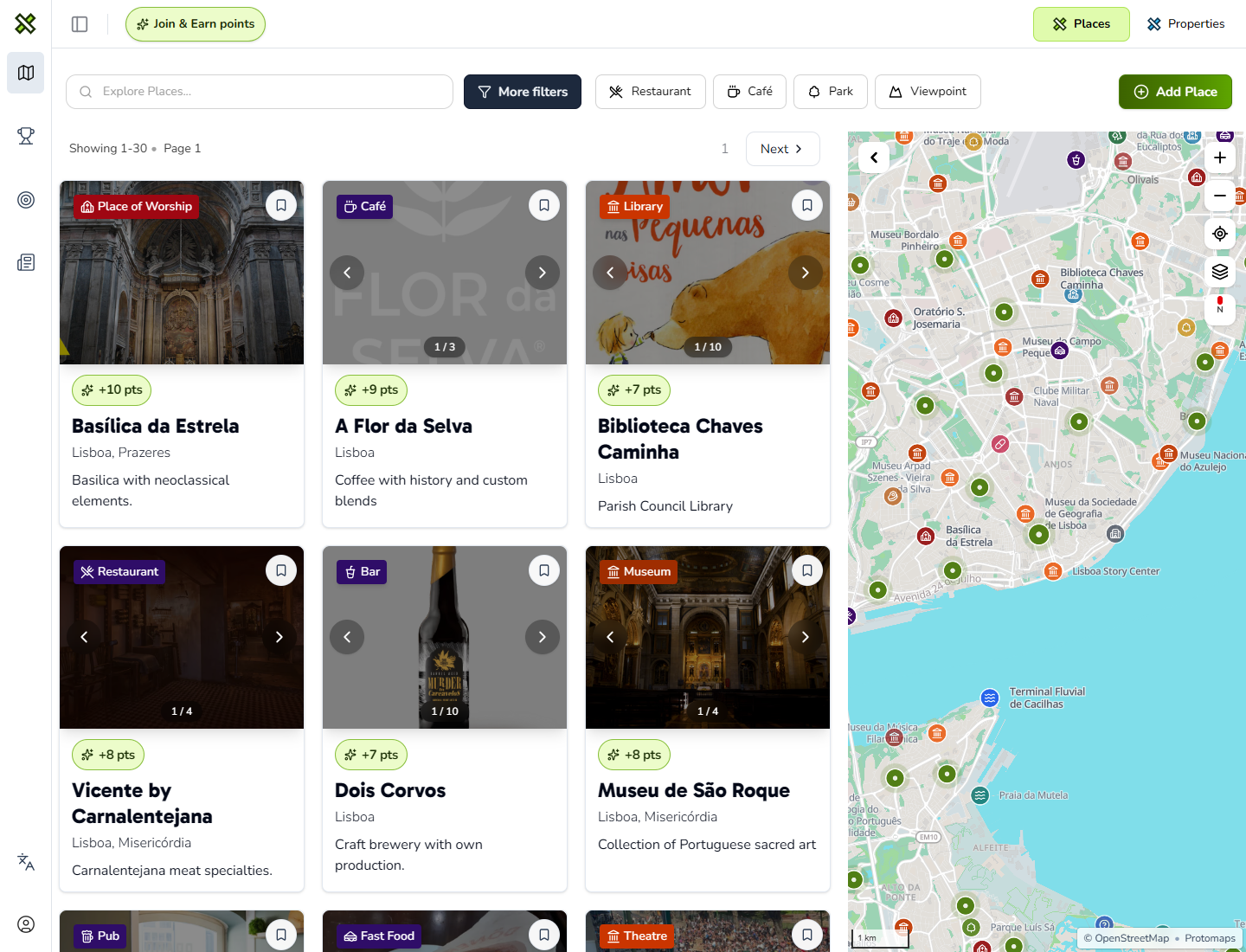
    I placed filters, cards, and the map side by side on desktop. Mobile uses separate views for comparing places and checking their location.

    Shown in:

    • Desktop and mobile Explore
  3. 03

    Make local details easier to update

    Local information can become incomplete or outdated.

    Design response

    People can suggest changes from Explore or a place page, then use drafts and review states to prepare and track their updates.

    Shown in:

    • Explore and place contributions

03

Help people picture life around a home

A listing shows the home. Yaca Places helps people explore what life around it could look like, from everyday errands to a favorite spot outdoors. That's the local ecosystem we're building on for Yaca Properties.

Places is live in beta. Bringing this context into the property search is still in development, with these questions guiding the connection.

  • 01

    What's nearby?

    Explore the shops, services, and local places around a potential home to picture everyday life there.

  • 02

    Where could I unwind?

    Find parks, beaches, and outdoor activities that could become part of a daily routine.

  • 03

    Would the area suit me?

    Some people want quieter surroundings with fewer tourists. Helping people explore areas by these preferences is a planned direction for Properties.

  • 04

    Could we picture living here?

    Save and share local places with the person you're moving with, so you can discuss the neighbourhood as well as the home.

Design system

Yaca Places design system

A focused foundation for the Yaca Places product: local discovery, contribution, map/list browsing, place detail, and reusable local-context patterns.

Product system

Yaca Places

Palette branch

Tailwind lime palette

Reusable UI

Type, spacing, states

Product foundation

Local discovery and contribution

Uses Tailwind lime shades for exploration, contribution, and local-context signals.

Tailwind lime palette

Color tokens in use

Product accents

lime-700

#4d7c0f

Primary buttons and active navigation

lime-100

#ecfccb

Card fills and icon backgrounds

lime-200

#d9f99d

Selected states and badge borders

lime-300

#bef264

Dark-mode highlights and focus accents

lime-950

#1a2e05

Accessible text on soft lime
Yaca core

Neutral tokens

Shared across Yaca

slate-950

#020617

Primary text and deepest dark sections

slate-900

#0f172a

Navigation and elevated dark surfaces

slate-800

#1e293b

Dark buttons and secondary surfaces

slate-500

#64748b

Secondary copy, metadata, and helper text

slate-200

#e2e8f0

Inputs, dividers, and card borders

neutral-50

#fafafa

Calm page backgrounds and light bands

60 / 48 / 38 / 30 / 24 / 18 / 16 / 14 / 13 / 12

Type hierarchy

Gabarito carries headings and editorial moments. Nunito carries body copy, controls, labels, helper text, and dense UI.

8 / 12 / 16 / 20 / 24 / 32 / 48 / 64

Spacing and radius

Stable stacks, equal-width cards, tighter product radius values, and softer marketing sections keep the system consistent.

WCAG AA minimum

Accessibility

Bright accents stay restrained on dark surfaces. Green and blue states keep readable text and visible borders.

04

Discover, save, and improve local places

I structured the live experience around four tasks: explore an area, inspect a place, save discoveries, and suggest updates. The map and list establish location, while place details explain what is there.

Saved lists let people collect and share places around a plan. Contributions start from the information people find, keeping suggested changes connected to the place they describe.

Journey

  1. Scan an area

    Browse places by location and category.

  2. Inspect a place

    Find practical details about what is there.

  3. Save and share

    Collect places in a list and choose who can open it.

  4. Suggest an update

    Prepare a contribution from the information you find.

05 · Design in use

From exploring an area to choosing a place

On desktop, the map and results support comparison side by side. On mobile, focused views make room for discovery, filtering, and place details.

Design decision 01 · Connected discovery

Connect Places and Properties through local context

Explore brings local discovery and contributions into one surface. The Places and Properties tabs express the wider product structure, with Properties intended to carry local context into decisions about homes.

Desktop Explore · Live beta
  1. 01

    Places to Properties

    Places is live in beta. The Properties tab points to the property experience in development.

  2. 02

    Contribute in context

    The Add Place action gives people a direct way to contribute local knowledge.

  3. 03

    Area context

    Map results show where places sit in relation to the surrounding area.


Mobile experience · Live beta

01 · Find nearby places

Keep the map in focus

Design decision

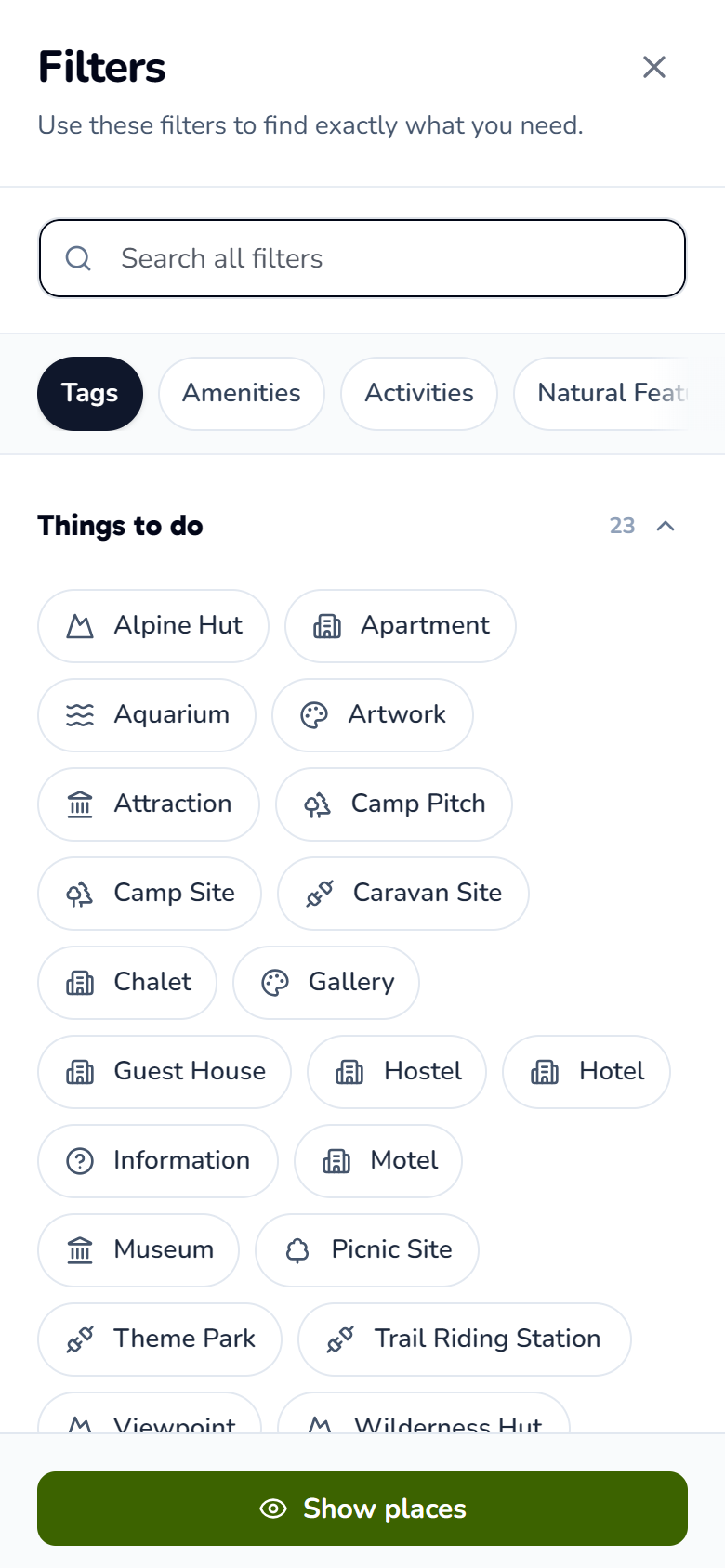
I kept quick categories and the results drawer around the map, and moved detailed filters into a separate sheet. This gives each task space on a small screen.

Tradeoff

Detailed filtering temporarily covers the map. Returning to the results restores the area context.

Explore map

Yaca Places mobile Explore map centered on Lisbon with nearby place markers, category filters, and the results drawer.

Browse nearby places with the map in focus.

Filter sheet

Yaca Places mobile filters sheet with categories and a Show places action.

Refine your search, then return to the map.


02 · Assess a place

Show the essentials, then the detail

Design decision

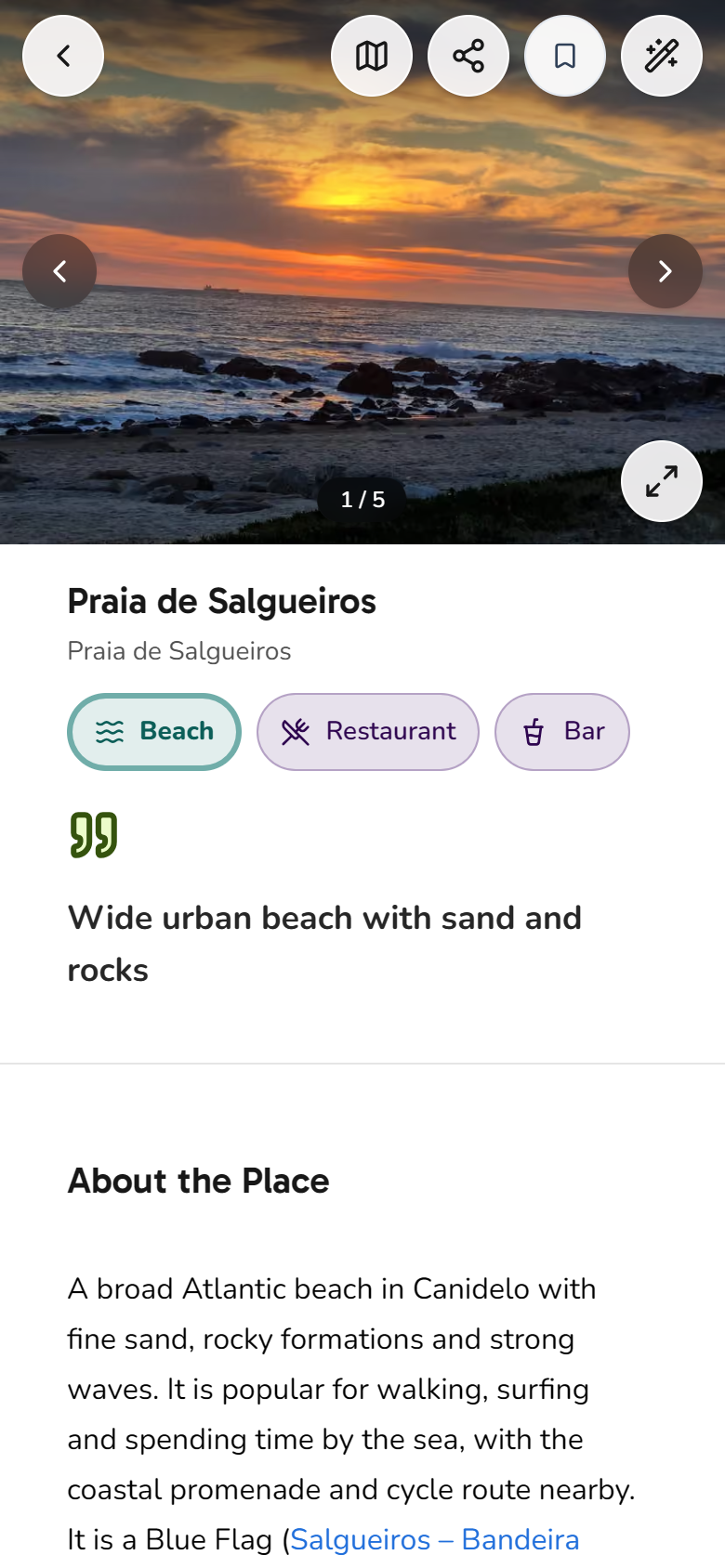
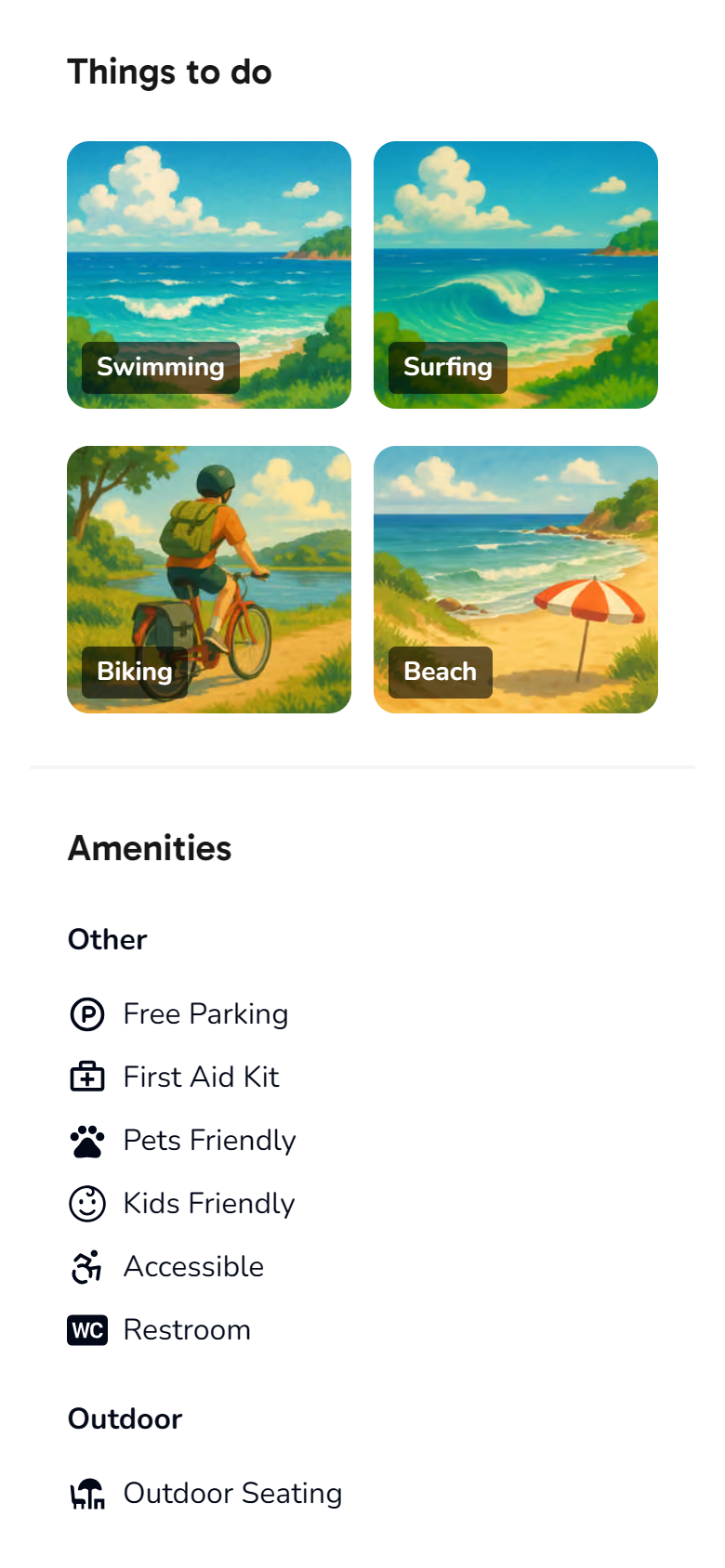
I organized the place page from overview to practical detail: photos and a short description first, followed by directions, activities, amenities, and opening hours. Each section answers a different question about visiting.

Tradeoff

A consistent hierarchy makes different place types familiar, but more detailed information requires scrolling.

Place overview

Praia de Salgueiros place overview with a beach photo, categories, a short summary, About the Place description, and an edit action.

Get a quick overview of Praia de Salgueiros.

Activities & amenities

Praia de Salgueiros activities and amenities: swimming, surfing, biking, beach, free parking, first aid, pet and child-friendly facilities, accessibility, restrooms, and outdoor seating.

See what to do and which facilities are available.

06 · Dashboard

Turn saved places into a shareable list

The dashboard gives people a place to return to their discoveries and contributions. Saved lists bring places together around a plan, with control over who can open them. The Contribute tab groups updates by review status so people can track their progress.

03 · Collect and share

Keep saving in context and sharing intentional

Design decision

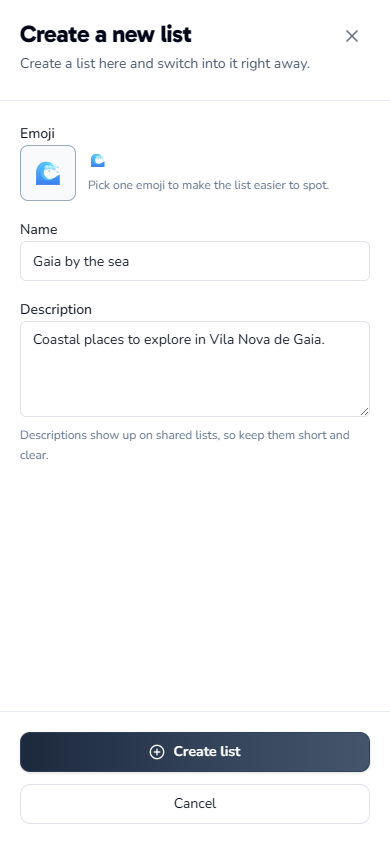
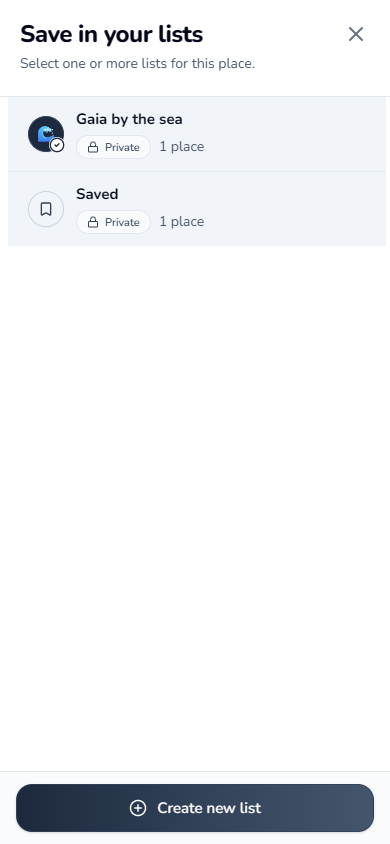
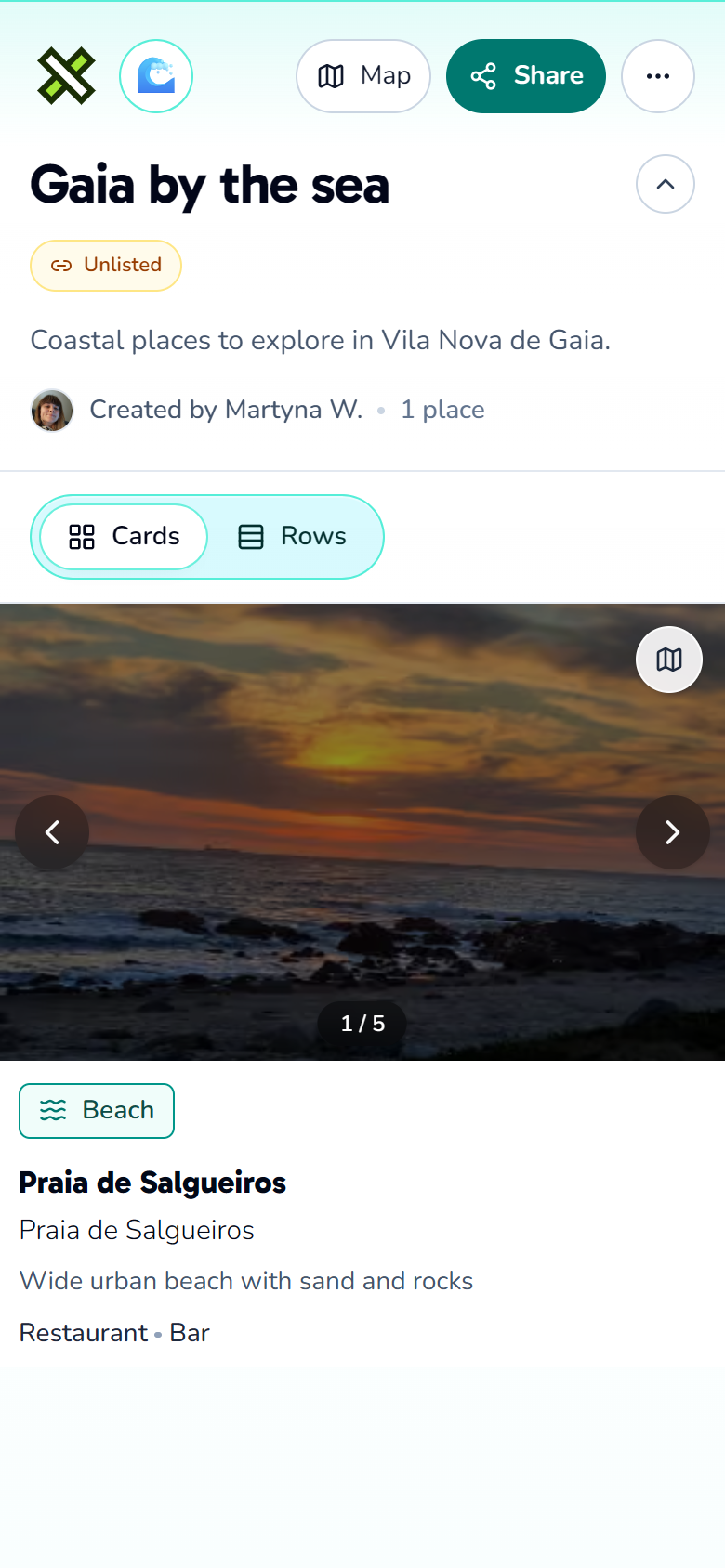
List creation lives in the dashboard, while adding a place starts from its detail page. Lists begin as private, and choosing Unlisted or Public enables a separate page for sharing. The example follows one list through all three steps.

Tradeoff

Sharing requires a visibility decision. Unlisted allows access by link without appearing in discovery. Private keeps the list personal.

01 · Create a list

Create a new list on mobile, with a wave icon, the name Gaia by the sea, a short description, and the Create list action.

Name your list and choose an icon.

02 · Add a place

Save in your lists picker with Gaia by the sea selected and one place saved, while the default Saved list remains unselected.

Save a place directly to your chosen list.

03 · View and share

Gaia by the sea shared list viewed without signing in, showing its Unlisted visibility, Share and Map actions, and the saved Praia de Salgueiros place card.

Share an unlisted link with no sign-in required.

07

A live foundation for Yaca Properties

Yaca Places is live in beta with area discovery, structured place details, saved lists, and contribution flows.

The work brings these journeys into one ecosystem built to provide local context for Yaca Properties. The property experience and its integration remain in development.

A key tradeoff was using a shared place model across categories. It supports consistency and reuse, while limiting how much the structure can adapt to each place type.

Next, I would define which local details belong alongside a home and how to present them without competing with essential property information.